Pages

Showing posts with label geek. Show all posts

Thursday, October 11, 2012

Extend Your WiFi Network!

In the process of getting settled into the girlfriend's apartment here in Shanghai it became painfully obvious that while the "premium" Huawei router included in the internet package may be good at reporting my internet activity to Chinese officials, it does a terrible job of getting WiFi through the ridiculously thick concrete interior walls.

I can take care of the former issue with a good VPN subscription that encrypts and then routes all of my internet traffic through California.  The latter issue wasn't a problem while sitting on the couch in the living room, three feet from the router, but when we decided to set up an office in one of the spare bedrooms on the other end of the apartment, the lack of a reliable internet connection became problematic.

Luckily, I brought along my old Linksys WRT54GL wireless router when I came to China, so I hoped that I could bridge the two routers onto the same network and therefore have a strong network connection in the office.  After a bit of searching, it turns out that I had my jargon wrong, and that by connecting one router to another with a cable to extend the range of the network, I was actually cascading the routers, and this is incredibly easy to set up.  Best of all, you don't have to mess with the original, primary router, which is good, because it's all in Chinese and I don't know the admin password.

All you need to do is follow the instructions on this Cisco Knowledge Base article, but here's the basic rundown with my commentary:

  • Disconnect your computer from your existing network.  
  • Plug the secondary (new) router into your computer via one of the LAN connections (not the WAN, we're not going to use that one).  
  • Connect to the secondary router by typing its address into your web browser (probably 192.168.1.1).  
  • Change fourth octet of the router's own IP address to something different than the existing router's, because it is probably 192.168.1.1 also, and that will cause a conflict.  I chose 192.168.1.250, but you can use anything between 1 and 253.  
  • Disable DHCP so the new router doesn't try to assign IP addresses to the devices that are connecting to it.  The original router will still do that and they will just get passed through.  
  • Make sure the SSID (name of the wireless network) and the wireless security settings are exactly the same as the original router.  This way your laptop / phone / etc will pass from one router to the other totally seamlessly.  
  • Optionally (not noted in the Cisco post, but mentioned in a couple other post I read), change the default broadcast channel so there's no overlap between the two routers.  I have no idea if this is actually needed or helpful, but the original one seemed to be set to channel 5, so I changed the new one to channel 11.  If you, like me, can't access the original router, you can use something like WiFi Analyzer on your Android phone to check it out.  
  • Make sure you save everything at each step, or else you're going to have to redo it all.  
  • Disconnect your computer from the new router and unplug the power from it, too.  
  • Get a really long ethernet cable, plug one end of it into one of the available LAN ports on the original router, and dangerously string it from one end of your house to the other.  Or run it in some less exciting way, like under the carpet or through the walls, but in this rented apartment with concrete walls and wood floors, I'm going to stick it to the wall with 3M Command hooks and call it good.  (Those things are great, btw.)  
  • Move the new router to its new home and plug in the power cable and plug the ethernet cable into one of its LAN ports (again, not the WAN, the original router is still taking care of that).  
That's it!  It's actually easier than my lengthy commentary makes it look.  You now have two routers broadcasting the same wireless network that you can move between without issue.  Setting it up this way also allows you to keep sharing network resources (drives, printers, etc), because your still on the same segment of the network (third octet of the IP address).  At some point in time you should also have changed the default password to access your router from "admin" to something a little harder to guess.

Now, to actually bridge two wireless networks together (no cable in between the routers), you need different equipment than I have.

If you're having this problem, too, I hope this helps!  One of these days I'll follow up with pictures of the office and its awesome view.

Thursday, May 24, 2012

CyanogenMod 7.2 on LG G2x

I've been using my first Android smartphone, the T-Mobile G2x (LG Optimus P999) - the first dual core smartphone out there - for about a year now and I'm still pretty happy with it.  Of course, I can't ever leave well enough alone, so after dealing with the random rebooting issues for the first few months and imaptiently waiting to see if LG or T-Mobile was going to do an over the air update to fix it, I went the Root and ROM route with CyanogenMod 7 last August (see this post for more info).

All has been well, and the usability and reliability gains over the stock ROM have been astounding.  My battery life is literally 50% better than stock, I get the notification lights that I so desperately missed, my phone only shuts off when I tell it to, and I get to have a slight smug superiority over those with stock phones.  ;)

But since Android 4.0 / Ice Cream Sandwich launched, oh, seven months ago now, I've been hoping it would trickle down to my, now old, phone in the form of CyanogenMod 9.  There seems to be a pretty good enthusiast base for my phone still, and there has been good progress mentioned in some of the forums, but no stable builds for my phone yet.

Since I needed to do something with my phone, and since CyanogenMod 7.2 RC2 had been released earlier this month, I decided to flash that to my phone and see what the differences were.  As always, I got nervous and searched for instructions (the most clear were here), but everything went extremely smoothly.  (Here's a good place to start get started modding your T-Mobile G2x.)

And the verdict is... there's no obvious difference.  But as least I can rest easy knowing that my phone is as up to date as it can be at the moment.

Tuesday, August 23, 2011

I was on TWiT's AAA! ...Kinda

Yesterday I was featured on All About Android #22, the TWiT network's weekly show about, well, the Android smartphone ecosystem!  Okay, not me in the flesh, but my question was read and answered on the air, and it was one of the best nerd moments of my life.  And of course, because it's TWiT, it's on video.

Let me set this up for you.  I've had my first Android phone, a LG p999 Optimus X2 / G2x on T-Mobile, for about four months now (since May '11), and I really dig it.  But lately I've been getting pretty annoyed by some of its quirks and decided to root it so I could get full control of and do a good backup in preparation for a change of some sort.  Having not gotten the OTA update to Gingerbread from T-Mobile, I was all ready to load the CyanogenMod ROM, but then I got a little freaked out by a warning about my phone being unrecoverable if something went wrong.

So, after reading the XDA forums for way too long, I decided to write to the all-star crew of All About Android and see what they had to say about it.  I remembered that Leo had a G2x (and apparently still does), and hoped that they could help me out.

What I got was way more than I could have hoped for.  A three minute walk through of exactly what to do for my situation, from the man, Leo himself.


(If you want to see Eileen read my slightly wordy question, start here.  And of course, watch the whole episode from the beginning for some really good stuff.)  

So there you have it.  I'm saved by the TWiT AAA team and Leo Laporte and now I've got a plan on how to attack my phone and put a sweet aftermarket ROM on it.

Of course, now I hear that you can force the update to 2.3.3 from T-Mobile, but I have a feeling that would undo my root, and at this point, I'm feeling pretty confident about just jumping right into CyanogenMod.

Saturday, April 02, 2011

Blog = Domain (Finally!)

As you may or may not have noticed, I finally got my ol' blog moved over to my own domain!  Phew, what a struggle that was.

The process of transforming my "Steaming Pile" blog at http://mnthomp.blogspot.com into "Matt's Maunderings" at www.mnthomp.com is mostly complete.  I need to make some changes to the theme / CSS - pull the title a little closer to the top of the page, move stuff around on the side bar - and add some content - the "about me" page, my photos, feeds, resume, etc. - but it's coming along nicely.  Steaming Pile still may have been a more appropriate name for what I post here, but it doesn't sound very professional or adult.  Although, when you think that I started this whole thing in 2005, it isn't so weird.

***
...So, I thought the process of transferring your Blogspot blog to a domain that I bought through Google and have Apps for Your Domain running on would be easy, quick, and simple.  I was wrong.  Turns out (obviously, in hindsight), that if you have the "Sites" service running on your Apps account, then you can't publish another site on top of it, because sites.mnthomp.com and www.mnthomp.com both point to the same place.  Duh.

Luckily, after a bit of digging (not simple) and some poking around with the domain management setting of my domain host (not easy), it all falls into place.  As soon as the DNS records update (not quick).  These two webpages were invaluable in helping me sort it all out: The Blogger help page "create a subdomain through eNom" (since "www" is actually a subdomain) and the post "Another blog is already hosted at this address" at The Real Blogger Status blog.

This still leaves me with a small question in the back of my mind.  My Apps account and my Blogger account are not the same.  How did Google let me put a Blogger blog attached to account A on a domain that is attached to account B?  I mean, I did have to change some of the domain settings that you shouldn't be able to do without access to both accounts, but they were not major changes.  So could I just start entering random domains into the custom hosting box and see of one takes?  Not sure how that would turn out, but I'm not gonna find out, either.  I'm leaving well enough alone!

Sunday, March 27, 2011

Ch- ch- ch- changes... (to the blog)

...Turn to face the strange!

Okay, well, not that strange.  I just figured that, with a few other recent changes in my life (that may or may not appear here), it was high time to update the computerized version of myself.

I started with my computer's desktop.  I've never been able to leave well enough alone, including the look of my computer.  I've tried Samurize, putting html on the desktop, dual monitors, aftermarket Windows themes, and the like, but now that I'm down to one monitor for a while and pretty happy with the desktop slideshow feature and most of the Aero chrome of Windows 7, I decided to give Rainmeter a go.  Here's the result (for now / click to make it bigger):
It's the Elementary 1.2 skin, just rearranged a little.  The guy who made it did a great job, but I had to shift stuff around to get the clock and weather where I wanted them and add a "D" drive to the system monitor.  The little buttons at the top-right are from somewhere else and control Winamp.  Something is amiss with my Winamp install, or something, causing the song title not to show up, so I just left Winamp in "Windowshade Mode."  This lets me control the volume, too, which is nice.  I found the desktop image at Simple Desktops.

Now I'm going to move on to my blog / website.  As of this writing, if you go to www.mnthomp.com, you get a  really stupid looking page I through together with Google Pages.  It does what it needs to, I suppose, but it's pretty lame.  My plan is to move my "steaming pile" blog to mnthomp.com, since even though the blog is still kinda lame, it's to a lesser degree.  We'll see how it goes.  (I'm using this mashable article as my guide.)

Also, I went hiking yesterday, which was fun.  Would have been better if I were slightly better prepared for the snow and ice, but still good for the first one of the season.

Wednesday, April 22, 2009

Coolest thing I've seen about Linux yet!

So, I've been using Ubuntu (first 8.10 and now pre-release 9.04) on my IBM laptop (thanks Lana!) for the past several months, and in general, I have been very impressed with its usability, capabilities, and function.

First of all, Ubuntu, like most Linux distributions is free (as in beer and speech), so that instantly gives it a leg-up on Windows for the computer tinkerer who occationally messes up their system beyond help and needs to reinstall. It also has a great update manager that keeps your system up to date without hitting you over the head with "genuine" versions and involuntary reboots. The out of the box folder organization leaves a little to be desired for users who are not used to Linux, but that's a pretty minor point of contention.

To further my uber geeky experiments, I recently setup a headless (no monitor or keyboard) file server to share, um, "data" between a small group using Ubuntu Server Edition 8.04. The setup was mostly smooth and the updates and installation of the pertinent programs was very straight forward, but using a text-only Comand Line Interface really left something to be desired when it came to renaming and moving files around. It's a long adventure of typing in the full path of the file you want to move and then the full path of where you want it moved to. Not really my idea of fun.

This brings me to my point of the coolest thing I've seen about Linux yet. While I was Googling around to figure out how to use SSH to access my server from off-site, I found this gem:
Re: How to use sshd

You can also do:

sftp://username@IP.add.re.ss

in nautilus or konqueror and it will allow you to do drag'n drop file moving.
How friggin' awesome is that? Not only does it get me a secure connection from any computer running Linux back to my server at home, it gives me a graphical environment to manipulate files and folders! Rock on!

Now, there's probably a Windows version of this, but it probably isn't free and definitely requires more work than I just invested in figuring this out.

Wednesday, October 15, 2008

Hey, Sven, is that Windows Mobile on your iPhone?

Just happened across this little bit of iPhone hackery while investigating some other, more realistic hackery for those of us unwilling to pay $100 a month to AT&T...

A Norwegian programmer built a bootcamp-like program for the iPhone to let you choose between Windows Mobile and the regular iPhone OS.

Pretty nifty, but I have never really heard much good about Windows Mobile, so I'm not sure how many users will really jump on this one. I am impressed with someone hacking a non-Apple OS into a notoriously closed-system Apple device, though.

From Code Retard.

Wednesday, September 10, 2008

The End is Near!

Oh, wait, what?  Just turning on the Large Hadron Collider didn't create a black hole to gobble up the Earth?  And it didn't produce a strangelet that destroyed all matter?  Oh... well, huzzah for CERN then!
As you may have heard, the European Organisation for Nuclear Research, better know by its French acronym "CERN," switched on it's new toy at about 2:36 a.m. Mountain time this morning -- And nothing bad happened.  Their new $5 billion, world's largest and most powerful (14 trillion electron volt) particle accelerator came online this morning without a hitch and sent a few partiles in a clockwise trip around it's 17-mile loop.  It won't get to do any smashin' for a few more weeks, but it will hopefully help physisicst a better understanding of the birth of the Universe by letting them see what the very first few nano-seconds of the Big Bang may have looked like.  

Cool.  More news at Wired and Google News, and of course, at CERN's site.  


Tuesday, September 02, 2008

Shiny new toy from the Big G!


Just announced (via comic book) yesterday and released to the masses today, Google's new open-source jaunt into the browser world, "Chrome," aims to help us get more done on the Internet with less junk in the way.  

Read about Chrome's nifty features here, and download it here.  

I downloaded in about 15 minutes ago and am immediately impressed.  It has a very Safari look to it, which is alright, but the first neat thing I noticed was the lack of a normal Windows title bar at the top of the window - talk about getting things out of your way!  I also promptly missed my Firfox extent ions, specifically mouse gestures and Focus Last Selected Tab, but Chrome imported all of my bookmarks without any problems (other than having to close Firefox to do it), and everything seems to work.  Since the "awesome-bar" name was already taken by FF3's spiffy new multipurpose address bar, Google called theirs the "omni-bar" since it's the one place to type anything at the top of the screen.  It seems to work very smoothly though, ever smoother than the 'Fox's.  

The other big thing is where the tabs are in relation to the address bar.  They're above it.  Each tab has it's own address bar, bookmark buttons, etc.  This may seem a little bit weird, but it really matches the way Chrome works - each tab is its own process in memory, so it doesn't have to share and when you close it, it's actually gone.  This lets Chrome handle memory much better than Firefox 2 or 3.  With four tabs open it appears to be consuming about 42 MB of RAM for the program itself and then 4 to 16 MB for each tab, depending on what each is doing, each in their own process.  While not exactly light weight, this is certainly not bad.  I will have to keep an eye on it to see how it goes after a couple hours worth of surfing.  

Of course, being Google, this new browser was released in beta form, but it definitely will be taken as a shot across the bow and a direct challenge by Microsoft.  Since Google's Chrome browser is written from scratch and with the open-source community in mind, I'm not sure how the other open-source browser, Firefox, will react to this development, but I think this is just what we needed to kick the browser wars up a notch.  

Give it a try, lemme know what you think!

Also, check out Lifehacker's screenshot tour here.  

Thursday, July 10, 2008

Black Holes "Racist"

A special meeting about Dallas County traffic tickets went pear shaped this past Monday when county commissioner Kenneth Mayfield (who is white) described the central collections office as a "black hole" because paperwork routinely gets lost there.

The Dallas Morning News describes what happened next:

Commissioner John Wiley Price, who is black, interrupted him with a loud "Excuse me!" He then corrected his colleague, saying the office has become a "white hole."

That prompted Judge Thomas Jones, who is black, to demand an apology from Mayfield for his racially insensitive analogy.

Mayfield shot back that it was a figure of speech and a science term.

Apparently, certain black democrats in the Dallas County, Texas (namely Commissioner John Wiley Price and Judge Thomas Jones) are either totally ignorant of some basic principles of science or are unapologetic, bigoted race-baiters.

A black hole is
...a region of space that has so much mass concentrated in it that there is no way for a nearby object to escape its gravitational pull. ... Incidentally, the name 'black hole' was invented by John Archibald Wheeler, and seems to have stuck because it was much catchier than previous names. Before Wheeler came along, these objects were often referred to as 'frozen stars.'" (source).
This seems like a pretty reasonable description to apply to an office where paperwork goes in and is never seen again. And I am pretty sure that replacing the non-catchy and less correct term "frozen stars" with "black holes" was not racially motivated.

Some people's kids. Sheesh.

*Update (18 July 2008): 850 KOA radio host and Rocky Mountain News columnist Mike Rosin expanded on this debacle in a column in today's paper. Mike's much funnier than I am, but he does get paid for this kind of thing. I'm glad this story got some national attention. Stupid people need to be called out into public once in a while.

Tuesday, June 17, 2008

Get Firefox 3 Today!

Four short years after Firefox 1.0 started to "reclaim the web," Firefox 3.0 has arrived! So help set a Guinness World Record (for most software downloads in a 24-hour period) and get Firefox 3 today here. (Or, the direct download link here.)

I've been using the release candidates for over a month now, and I can wholeheartedly recommend it for anyone to use.

Do it! All the cool kids are! ;)

Friday, May 23, 2008

Geohashing

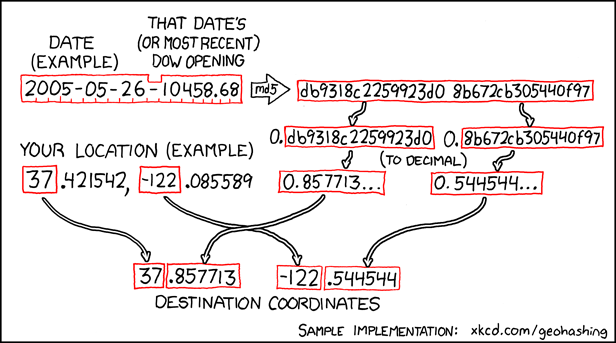
Okay, so some people have probably heard of Geocaching - where GPS nerds get a set of coordinates off the Internet and go find it / them and make a little game out of it. But I doubt anyone has heard of Geohashing yet, since I think it was invented earlier this week when the folks at the totally nerdy web comic XKCD posted this comic:
Essentially, the date is combined with the Dow Jones Industrial Average's opening value, put through an md5 hash algorithm, split into two numbers, converted from hexadecimal to decimal, and then added to the end of any set of whole number (no decimals) latitude and longitude coordinates.

Still with me? Okay, good. Since I am going to Grand Junction this weekend, I put Saturday's date (2008-05-24) into the map lookup and click on Grand Junction. The results of the hash must have been 0.126648 and 0.547534, which, when added to the nearest latitude and longitude of N39 and W108 result in the coordinate location 39.126648°, -108.547534° or N39°7'35.93", W108°32'51.11", which turns out to be about one-half a mile north of H Road on 27-1/4 Road, just West of the airport, Walker Field. Seems like it should be pretty easy to get to.

Here is the group participation part of this extremely nerdy game: there is a "meeting" every Saturday at 4:00 p.m. at the randomly determined location in each graticule (area within the integer lat, lon lines) where, if anyone shows up, you have a little party. Or something.
Apparently, Denver has a relatively active Graticule (four, actually, but you can read about that here), so you might actually see someone there. GJ, on the other hand, does not, so its gonna be lonely if I actually make it there on Saturday at 4 o'clock.

Not sure if this little concept has any staying power once the novelty wears off, but if you just need a random place to meet someone within a certain geographic area, it should work pretty well, as long as the place is accessible, that is. Since, by the very nature of this thing, it is random, the coordinates might end up in a lake, the ocean, military base, cliff, inaccessible mountain, etc. If that happens, I suppose you can either wait for a better location or just put in another date and see what happens.

Sorry, that was too nerdy not to share! Check it out!

Tuesday, April 01, 2008

Gmail Custom Time

Google always has to be on the bleeding edge of innovation. Today they introduced a new feature that is sure to be the envy of all of the other geeky email services: Gmail Custom Time.

Now you can send email from the past, (not before 01 April 2004, though) and have it show up in the correct order in the recipient's inbox!

They must be rolling it out slowly though, like they have done with other new features, because I still don't have the "custom time" option in my compose window. Oh well, I can wait - because when I get it, I can always send an email from the past as if it were already there!

April Fools! That's totally not possible.

Yay, that was a good one, Google.


**Update: More Google April Foolery - Project Virgle! A colony on Mars.

Wednesday, March 05, 2008

Bringing OCD to the Desktop

So, maybe I need to sit in front of the computer less. Maybe I should geek out a little less. Or maybe I just need to not worry about exactly how much processor time and RAM my computer is using this very second. Or maybe I need a prescription.

In any event, if you, like me, need to know precisely what your computer is doing at all times, let me be your guide.

First, you'll want to download Sysinternals' Process Explorer to replace the lousy Windows Task Manager that doesn't really tell you much. It's currently in version 11.11, so it looks like I'd better upgrade! Download the .exe and plunk it down in your c:\windows\system32 folder. Ctrl-Shift-Escape to launch it, then click on View and Select Columns. Then in the Process Memory tab, check Working Set Size and hit OK. Mess around with it a little. It's pretty spiffy, and now you're just a key combo away from knowing what's running, killing stubborn processes, and restarting the ones that actually need to be there.

Secondly, since you may actually need to get something done, and that involves not watching the Process Explorer non stop, you'll want to download Serious Samurize so you can embed some of that info (and tons more) right on your desktop.
All my configuration currently does is display the date, processor and memory use, and the current Winamp track in a little box in the lower right corner of my screen. Now I don't even have to open Process Explorer to constantly glance at my computer's resource use. (Which seams unreasonably high, but that's just another thing for me to fret about!)

I was going to try to include the configuration file so you could be exactly as cool as me, but I can't figure out how to host anything other than pictures and videos here.

Anyways, that's my little obsessive compulsive computing tip for today. Do with it what you will, but if you find yourself constantly looking at how much processor it takes just to open a new tab in Firefox, don't say I didn't warn you!

Tuesday, January 01, 2008

Happy New Year and 25 Years of TCP/IP

Welp, it's 2008. I'd better try to remember to write that on checks and stuff now! I hope your 2007 was great and your 2008 will be even better.

In other news today, TCP/IP turns 25 years old today. It's good to know that I am older than the protocol that makes the entire internet work. I guess you could say I'm 'Pre TCP/IP'. As with most things that really took root and changed the technological / industrial world, TCP/IP was adopted and backed by the United States government with the ancestor of the modern Internet, its ARPANET network.

Basically TCP/IP is the set of numbers that make allow the internet to find itself. Every connection to the internet has its own, specific IP address (like 216.136.227.255 which is one of Yahoo's) which is organized by the TCP system so that your browser, search engines, etc, can find the stuff that you are looking for. The DNS servers convert those numbers into names, but that's a totally different story.

Also, I was reminded to eat my black eyed peas today for fortune in the new year, so you'd better do that too. Here's the recipe I think I'm going to try.

Wednesday, October 03, 2007

Verizon probably can't un-brainwash people with their new phone

Regarding the new Verizon / LG "iPhone killer" Voyager, Farpoint Group analyst Craig Mathias says: "Apple is unique in high tech, in that they are not just a manufacturer, marketer and brand. They are, rather, a destination, and many people would simply never consider buying a product competitive with Apple’s rendition of same."

Isn't that sad? That otherwise (relatively) intelligent people, who are so blinded by their lurv for all things Apple, would "never consider" anything else? I guess that's why they call it the Cult of Apple.

Monday, August 27, 2007

Taking Voer!

Durring a discussion about what kind of type face would be appropriate for certain kinds of advertising, the following occured:
Melissa: the gowns, they are taking voer!
Matt: taking voer, nice
that's a fun word to say
"voer"
too bad it doesnt mean anything
Melissa: lol
Sent at 1:00 PM on Monday
Melissa: too bad
Sent at 1:09 PM on Monday
Melissa: add one letter and it becomes voyer tho...